

Metronome
Metronome, in the sidebar’s Tools, opens its page: everything it can do, set once and remembered on this device. It keeps time while you move around Songverse; a small button at the bottom of the screen shows its tempo and beat, takes you back to its page and stops it.
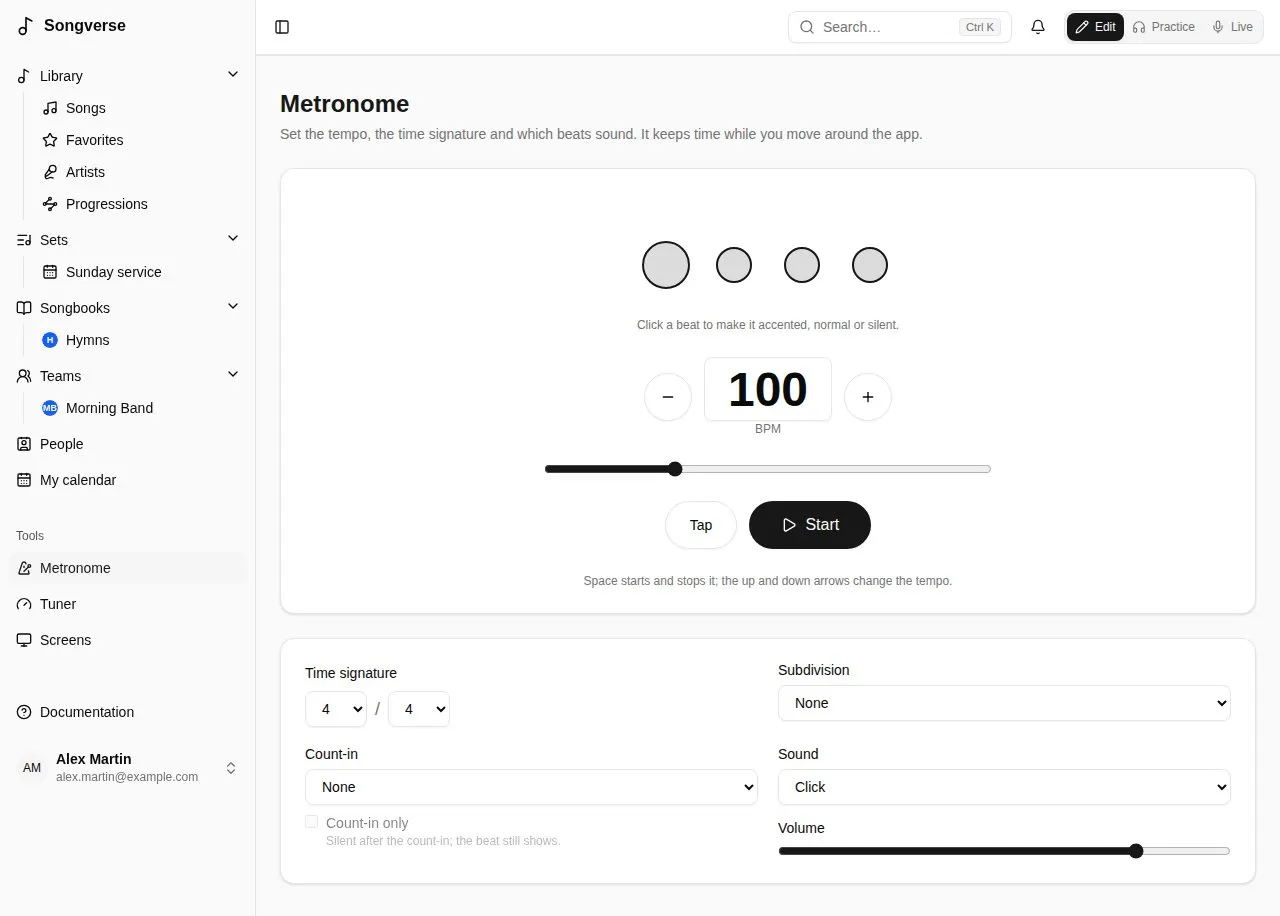
- − and + change the tempo a beat per minute at a time; type it in, or drag the slider (20 to 300 BPM).
- Tap: tap it in time with the music, and the metronome takes that tempo.
- Start and Stop. With a keyboard, Space starts and stops it, and ↑ ↓ change the tempo (by 5 with Shift).
A new tempo takes over on the next beat, without stopping.
Time signature and pattern
Section titled “Time signature and pattern”- Time signature: the beats per bar and the beat’s value - 4 / 4, 3 / 4, 6 / 8… The tempo counts those beats: in 6/8, eighth notes.
- The circles are the bar’s beats: the one you hear lights up, the first of the bar is bigger. Click a beat to make it accented, normal or silent - for example, only beats 2 and 4, or a bar with its last beat left out.
- Subdivision adds clicks between the beats: 2 per beat, Triplets or 4 per beat, softer than the beats.
Count-in
Section titled “Count-in”Count-in plays one or two bars before the song, every beat heard. With Count-in only, it goes silent after them: the circles keep showing the beat, for a band that only needs to be counted in.
Sound and volume
Section titled “Sound and volume”Sound: Click, Wood block or Beep; and its Volume. The sound is made on your device, so the metronome works offline.
Use wired headphones or the device’s speaker: Bluetooth headphones hear it a fraction of a second late.
At a song’s tempo
Section titled “At a song’s tempo”In Live, on a song’s page in a set and on a song’s page in Practice, the metronome button (on a song’s page, it shows the song’s tempo: 76 BPM) starts it at the song’s tempo and time signature (its version’s, when the set plays one) in one press; press it again to stop. It uses your pattern, sound and count-in from the Metronome page, and flashes with the beat. A song without a tempo can’t start it: add one on its Song info.
Playing with others, the leader’s metronome can be everyone’s, in time: see Playing in sync.
At the top of a song in Practice and in Live, the bars row puts the song’s chords in bars and beats, with the metronome:
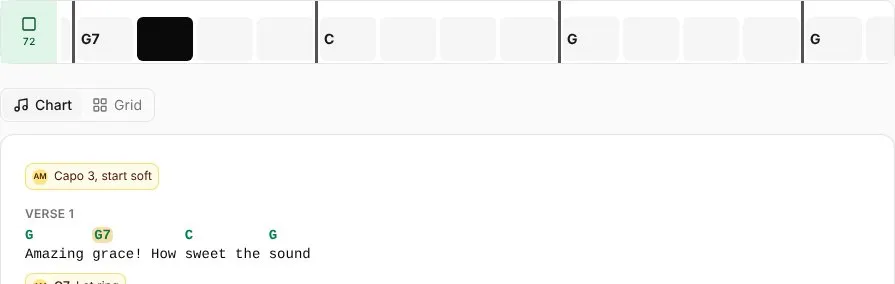
- A box for each beat. A strong line starts each bar, and a chord’s name sits on the beat it starts on. Each section’s name (V, C, B…) is on its first bar, in the structure bar’s colours.
- The metronome button at its left shows the song’s tempo and starts or stops the click at it.
- While the music plays, the beat being played fills and the row slides along, so what’s coming stays in view. It follows the song’s stems or recording when they’re playing - beat by beat when the stem separation found its beats and bars, else from its tempo and first beat - else the metronome, including the leader’s when you play in sync. Stopped, it stands at the first bar and you can scroll it.
- The chords read as on the chart: transposed, with your capo, names and colours.
The bars come from the chart’s bar lines when it has them. Otherwise from its chords: each chord gets a bar, and a sung line takes at least two (a line with one chord holds it for a second bar). Lines of chords alone (an intro) take a bar per chord, and notes take none. Each bar has as many beats as the song’s time signature says, and a section can have a time signature of its own in the song’s order.
Display > Chords > Bars hides it, separately in Practice and in Live (see Display).
Chord grid
Section titled “Chord grid”Chart / Grid above a song (in Practice, on its page in a set, and in Live’s header) reads the song as a chord grid instead of its chart: the same bars, laid out like a lead sheet.
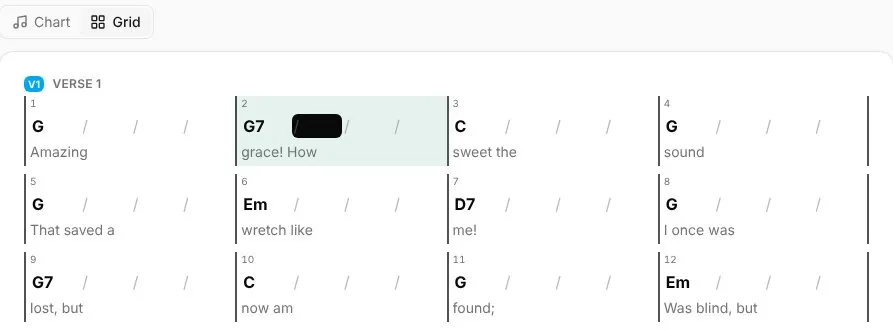
- Four bars to a row (two on a phone), each section under its name, with its time signature where it changes.
- Each bar has its number, a slash for each beat and the chord on the beat it changes on. A chord held on from the bar before is named again, in grey. Underneath are the words sung in that bar (from the chord or the bar line they start at to the next one).
- While the music plays, the bar and the beat being played light up, and the grid scrolls to keep that bar in view. It follows the same things as the bars row: the stems, the metronome, or the leader’s.
- The chords read as on the chart: transposed, with your capo, names and colours, and on a set’s song page your Simpler chords and No bass notes too.
Your choice is kept for the song, as a PDF’s is: every device you sign in on, and Live, show it the same way. To read every song this way unless you choose otherwise, set Songs read as to Chord grid (bars) (see Chart display).